
GFX Tool for Standoff 2 - Google Play
You'll be able to see results in few seconds.
Publisher Description
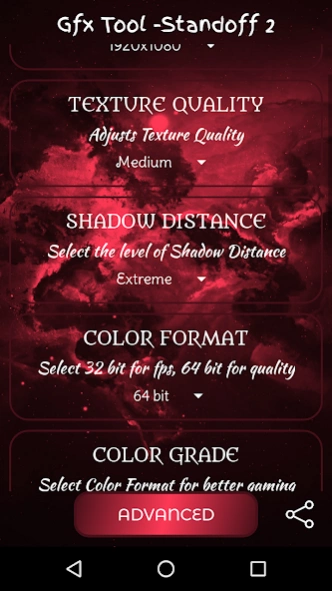


GFX Tool for Standoff 2 - Maximum FPS
GFX Tool for Standoff 2 Mobile Game for All Devices
This is GFX Tool for Standoff 2 Mobile Game - HDR Graphics and Unlock Maximum FPS Limit - 144 fps
How to use GFX Tool?
- First open GFX Tool Application
- Select graphics settings as per compatibility of your device
- Click on Apply
- Enjoy Gaming
This GFX Tool works as an advanced graphics optimizer for mobile game.
You can customize the shadows, textures quality, screen resolution, unlock the FPS limit and much more.
⭐⭐ Application Features:
⭐ No Ban / No Lag / Anti Lag
⭐ CPU & GPU Boost
⭐ Color Rendering Level: Enable 32 Bit / 64 Bit colors
⭐ Zero Lag Mode + Battery Efficient : Optimized game configuration
⭐ 1080 Resolution: Change the resolution of the game.
⭐ More Options for Resolution.
⭐ HDR Game Graphic: Unlock the HDR graphics on low end devices.
⭐ Extreme FPS: Unlock the Extreme FPS level.
⭐ Styles: Change graphics style setting.
⭐ Shadows: Select best shadow level or Disable.
⭐ Shadow Distance: Select shadow distance level.
⭐ Moving Shadows: Enable or Disable shadows of players and cars.
⭐ Light Effects: Disable for better performance.
⭐ GPU Optimization: Enable to reduce useless effects.
⭐ Sound Quality: Enable to fix low volume issues.
⭐ Memory Boost : Boost up the game performance
Graphics is what you're looking for if you're in need of improving your visuals without the headache of manually re configuring your smartphone. All you have to do is select the resolution you like, frames per second, and the type of graphics you want displayed.
✔️ Resolution
Here we referring to Video resolution of the game that means the number of pixels displayed in width x height. So, this GFX software supports from 950×540 to 2560×1440 pixels resolution, which covers even the HDR quality video games.
If your game has HD & HDR graphics options, then you can go to resolution option of this GFX Application and set it either on 1920×1080 or 2560×1440.
✔️ Graphics
In this GFX Tool, there are multiple graphic improvement options from smooth to HDR.
You can choose your compatible option, but for that you will to select the supportive resolution.
For example, you have selected HD graphics, then you will have to select 1920x1080 pixels resolution.
★ Note :
-> This app contains ads.
-> All trademarked names and images are only used as references, and we do not intend to violate or take ownership of these names and images.
-> If we are in breach of copyright, please let us know and any request to remove one of the - Images or Logos will be honored.
-> For that contact us through Email
About GFX Tool for Standoff 2
The company that develops GFX Tool for Standoff 2 is HM Creations. The latest version released by its developer is 1.0 .
To install GFX Tool for Standoff 2 on your Android device, just click the green Continue To App button above to start the installation process. The app is listed on our website since 2020-06-27 and was downloaded 1 times. We have already checked if the download link is safe, however for your own protection we recommend that you scan the downloaded app with your antivirus. Your antivirus may detect the GFX Tool for Standoff 2 as malware as malware if the download link to com.hmcstof2.gfxtool_standoff2 is broken.
How to install GFX Tool for Standoff 2 on your Android device:
- Click on the Continue To App button on our website. This will redirect you to Google Play.
- Once the GFX Tool for Standoff 2 is shown in the Google Play listing of your Android device, you can start its download and installation. Tap on the Install button located below the search bar and to the right of the app icon.
- A pop-up window with the permissions required by GFX Tool for Standoff 2 will be shown. Click on Accept to continue the process.
- GFX Tool for Standoff 2 will be downloaded onto your device, displaying a progress. Once the download completes, the installation will start and you'll get a notification after the installation is finished.
Program Details
System requirements
Download information
Pricing
Version History
version
posted on 2020-06-27
Added support for devices
Disclaimer
Official Google Play Link
We do not host GFX Tool for Standoff 2 on our servers. We did not scan it for viruses, adware, spyware or other type of malware. This app is hosted by Google and passed their terms and conditions to be listed there. We recommend caution when installing it.
The Google Play link for GFX Tool for Standoff 2 is provided to you by apps112.com without any warranties, representations or guarantees of any kind, so access it at your own risk.
If you have questions regarding this particular app contact the publisher directly. For questions about the functionalities of apps112.com contact us.
